Gold 3D Text Effect: A Practical Guide for Seamless Design Integration
The Gold 3D Text Effect is a powerful design element that adds visual depth, professionalism, and a touch of luxury to any project. Whether you're creating marketing materials, presentations, social media assets, or branding elements, this effect can elevate your work from ordinary to extraordinary. What makes it particularly valuable is its ease of use and compatibility with Adobe Photoshop, allowing even those without advanced design skills to achieve impressive results quickly.
This article will guide you through the practical implementation of the Gold 3D Text Effect, focusing on how it integrates into real-world workflows, what tools and processes support its use, and how to ensure consistency and quality in your designs. The goal is to provide actionable insights that help you incorporate this effect efficiently into your creative process.
Understanding the Gold 3D Text Effect
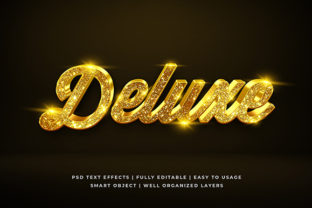
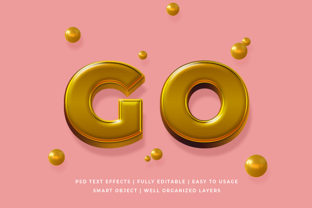
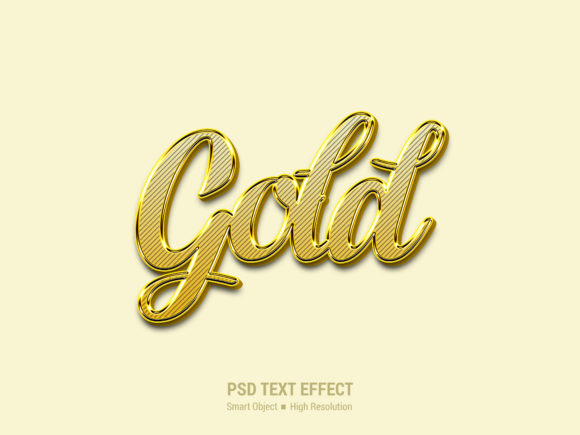
The Gold 3D Text Effect refers to a stylized text design that simulates the look of three-dimensional gold lettering. It typically includes lighting effects, metallic textures, and subtle shadows to create a realistic, eye-catching appearance. This type of text is often used in logos, headers, banners, and promotional content where a premium feel is desired.
What sets this particular effect apart is its smart object replacement feature. When working with pre-designed PSD files, users can simply double-click on the smart object layer, paste their custom text or graphic, and save the file. This eliminates the need for complex editing or reworking the entire design, making it highly efficient for both beginners and professionals alike.
Where Does the Gold 3D Text Effect Fit Into Your Workflow?
The Gold 3D Text Effect can be utilized at various stages of a design project. Here's how it might integrate:
- Pre-Design Phase: During planning, you can use this effect as a reference for the tone and style of your final output. It helps set expectations for clients or stakeholders about the visual direction of the project.
- During Design: Once you've selected the right font, color, and layout, applying the Gold 3D Text Effect becomes a key step in bringing your vision to life. It allows for quick experimentation with different text variations without affecting the rest of the design.
- Post-Production: After the main design is complete, you can add the Gold 3D Text Effect as a finishing touch. It’s especially useful when enhancing headlines, titles, or call-to-action sections in digital or print formats.
Its flexibility means it can be applied to projects ranging from simple social media posts to comprehensive brand identity systems.
How to Use the Gold 3D Text Effect in Practice
Using the Gold 3D Text Effect involves a straightforward process that requires minimal technical skill. Here’s a step-by-step overview of how to implement it effectively:
- Download the PSD File: Obtain the pre-designed PSD file that contains the Gold 3D Text Effect. Ensure that the file is compatible with your version of Adobe Photoshop.
- Open the File in Photoshop: Launch Photoshop and open the downloaded file. You'll notice that the text is embedded within a smart object layer.
- Edit the Smart Object: Double-click on the smart object layer to open it in a new window. This allows you to replace the existing text with your own content.
- Paste Your Design: Copy and paste your desired text or graphic into the smart object window. Make sure the text is properly aligned and formatted to match the original design.
- Save and Close: Save your changes and close the smart object window. Return to the main document and save the updated file.
This process ensures that your custom text retains the high-resolution quality and layered structure of the original design, providing a polished and professional result.
Key Features That Enhance Usability
The Gold 3D Text Effect comes with several features that make it an ideal choice for designers and non-designers alike:
- Smart Object Replacement: As mentioned earlier, this feature allows for easy customization without altering the underlying design elements.
- High Resolution: The effect is designed to maintain clarity and sharpness even when scaled up, ensuring that it looks great in both digital and print formats.
- Easy to Use: No advanced design skills are required. The intuitive interface and clear instructions make it accessible to users of all experience levels.
- No Skill Requirement: Even those who are new to graphic design can achieve professional-looking results with minimal effort.
- Fully Layered and Organized: The PSD file is structured with well-organized layers and folders, making it easy to navigate and modify specific elements if needed.
These features collectively contribute to a seamless user experience and reduce the time required to produce high-quality designs.
Integration with Other Tools and Resources
The Gold 3D Text Effect works well with a variety of other design tools and platforms. For instance, after creating your text in Photoshop, you can export it as a PNG or JPEG file and import it into programs like Canva, Illustrator, or even video editing software such as Premiere Pro or After Effects.
Additionally, the effect can be combined with other assets such as background images, icons, or illustrations to create more complex compositions. Its compatibility with vector-based graphics also means it can be scaled without losing quality, which is essential for responsive web design and large-format printing.
Practical Tips for Consistency and Quality Control
To ensure that your use of the Gold 3D Text Effect remains consistent across multiple projects, consider implementing the following tips:
- Create a Style Guide: Document the preferred fonts, colors, and spacing guidelines for the Gold 3D Text Effect so that all team members follow the same standards.
- Use Templates: Develop reusable templates that include the Gold 3D Text Effect as a default element. This speeds up the design process and maintains uniformity.
- Test Across Devices: Always preview your designs on different screens and devices to ensure that the text effect remains visually appealing and legible.
- Keep Files Organized: Maintain a clear folder structure for your PSD files and related assets. This helps streamline the workflow and reduces the risk of confusion or duplication.
By incorporating these practices, you can ensure that your designs remain professional, cohesive, and adaptable to various use cases.
Conclusion
The Gold 3D Text Effect is more than just a design element—it’s a versatile tool that enhances the visual appeal of your projects while simplifying the design process. Whether you're a seasoned designer or a beginner looking to create stunning visuals, this effect offers a reliable way to add depth, professionalism, and a touch of elegance to your work.
By understanding how to use it effectively and integrating it into your workflow, you can unlock new creative possibilities and deliver high-quality results consistently. With its ease of use, compatibility, and attention to detail, the Gold 3D Text Effect is an invaluable asset for anyone involved in graphic design, marketing, or content creation.