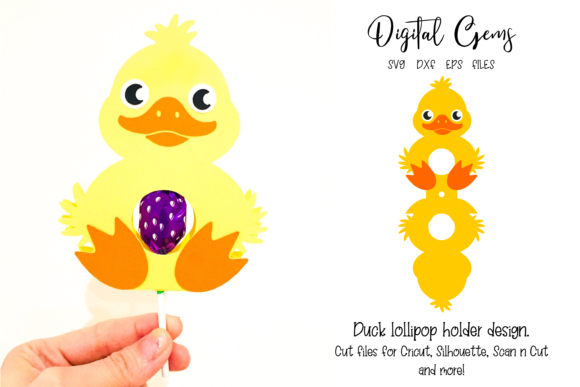
Duck Lollipop Holder Design
If you are looking to add a whimsical touch to your next party, craft fair, or small business offering, the Duck Lollipop Holder Design offers a charming solution that blends functionality with cuteness. This digital download is not just a static image; it is a functional template intended for physical crafting. It guides you through creating a three-dimensional treat holder shaped like an adorable duck, perfect for holding standard-sized lollipops. Whether you are a hobbyist looking for a fun weekend project or a small business owner aiming to create unique gift sets, this design provides the blueprint needed to bring these cheerful treats to life.
However, before you dive into cutting and gluing, it is crucial to understand exactly what you are purchasing. Many creators make the mistake of assuming that a digital file includes the finished product or the necessary materials. The reality is that you receive a set of vector files designed to be printed or cut on cardstock. Without the right preparation, the final result may look nothing like the colorful mockups seen in promotional images. Understanding the distinction between the illustration and the physical build process is the first step toward a successful outcome.
Navigating Common Pitfalls in Digital Crafting
One of the most frequent errors people make when working with digital cut files is overlooking the specific requirements of their cutting machine. The instructions specify that the design was cut at 4 x 11 inches to fit regular lollipops. If you simply import the file without adjusting the scale in your software, you might end up with a holder that is too small to hold a stick or so large that it looks disproportionate. Always verify the dimensions in your cutting software before sending the job to your electronic cutter. A slight miscalibration here can lead to wasted cardstock and frustration later.
Another common misunderstanding involves the nature of the included assets. The images you see on the sales page—featuring vibrant backgrounds, logos, and perfectly styled photos—are for illustration purposes only. They are meant to inspire you, not to represent the raw files you will receive. New users sometimes expect the download to include pre-colored layers or high-resolution photography they can use directly in marketing materials. In truth, the ZIP file contains technical vector formats (SVG, DXF, EPS) ready for your own customization. Expecting the "finished" look from the file alone often leads to disappointment. You must be prepared to do the creative work of coloring, assembling, and styling the final product yourself.
Selecting the Right Materials Matters
The durability and appearance of your Duck Lollipop Holder depend heavily on the materials you choose. The instructions recommend using colored card and glue. While any paper will technically hold together, using flimsy printer paper will result in a wobbly, easily crushed holder that cannot support the weight of a lollipop. Conversely, using heavy chipboard might make the folding and gluing process difficult if the pieces are not scored correctly. For the best results, opt for a medium-weight cardstock that holds its shape but folds cleanly. This balance ensures that the structural integrity of the duck remains intact while allowing for precise assembly.
When preparing your materials, consider the color coordination. Since the design requires you to assemble body parts separately, choosing contrasting colors for the face and the body can enhance the visual appeal. However, be cautious with overly bright neon cards, as they can sometimes wash out the details of the cut lines during the gluing process. A matte finish generally photographs better than a glossy one, which can cause glare in product shots. Taking the time to select the right paper stock is a small investment that pays off in the quality of the final presentation.
Maximizing Efficiency and Quality
To avoid wasting time and resources, always extract the contents of the ZIP file immediately after downloading. Attempting to cut directly from a compressed folder or navigating through nested subfolders during the cutting process is a recipe for error. Once extracted, open each file format (SVG, DXF, EPS) in your preferred software to ensure the layers are organized correctly. Sometimes, files arrive with extra bounding boxes or unwanted background elements that need to be deleted before cutting. Skipping this check can result in your machine trying to cut around invisible frames, ruining your cardstock.
When assembling the holder, precision is key. The instructions guide you to put the lollipop stick through the smallest middle hole before folding the design in half. A common mistake is attempting to glue the pieces shut before ensuring the stick is seated correctly. If you glue the sides down prematurely, you may find that the lollipop no longer fits or sits crookedly. Always test the fit of the stick with the unglued halves first. This simple verification step prevents the need to disassemble a glued piece, saving both time and material.
- Verify Dimensions: Ensure your software scales the file to the correct 4 x 11-inch size before cutting.
- Check File Integrity: Open all SVG, DXF, and EPS files to remove any unnecessary background layers.
- Test Fit First: Insert the lollipop stick before applying permanent glue to the final fold.
- Material Selection: Use sturdy colored cardstock to ensure the holder stands upright and holds weight.
By approaching the Duck Lollipop Holder Design with a clear understanding of the process, you can transform a simple digital file into a delightful physical object. Avoid the trap of expecting instant perfection from a download; instead, embrace the craft aspect of the project. With the right tools, careful planning, and attention to the assembly steps, you will create holders that are not only functional but also visually stunning. Whether you are gifting them to friends or selling them at a local market, taking the time to get the details right ensures your final product reflects the quality and care you intend to show.